MetaTrader can help organise binary options analysis: inspect price movements, apply indicators and record signals for later review. Its useful role is analytical. A chart signal does not establish the price at which a contract would start, the quote used for settlement or whether the payout would justify the risk.
For Australian retail readers, the regulatory position comes before the software. ASIC’s binary options product intervention order prohibits their issue and distribution to retail clients and is scheduled to remain in force until 1 October 2031. The workflow below concerns educational analysis and paper testing, not a route around that restriction.
Can You Trade Binary Options Directly in MetaTrader?
Not simply by opening a normal order ticket. MT5’s documented standard order types include market orders, pending orders and orders that close an opposite position. They do not provide a ready-made high/low binary contract with a stake, expiry and fixed payout.
Do not confuse a pending order’s expiration time with binary options settlement. The former controls how long an unfilled order remains valid. The latter determines when an existing binary contract’s outcome is assessed.
Separate three jobs in any research process: generating a signal, defining a hypothetical contract and calculating its outcome. MetaTrader may help with the first job, but that does not mean its ordinary trading reports answer the other two.
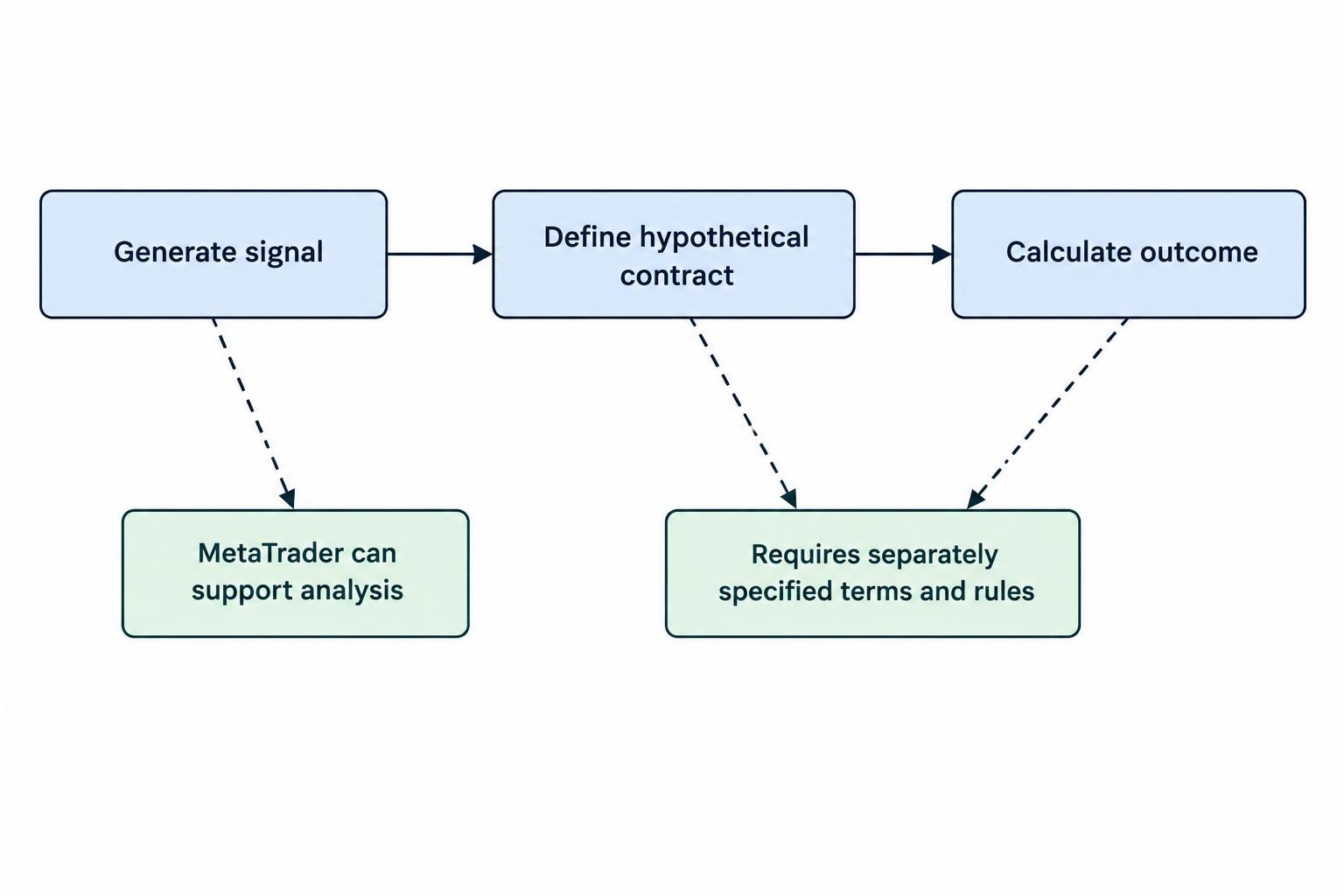
If a third party advertises a binary options bridge or plugin, assess that product separately. Do not treat the MetaTrader name as evidence that an integration is approved, reliable or permitted for Australian retail distribution.
Choosing MT4 or MT5 for Analysis
Start with the tools your study needs rather than assuming one platform produces better forecasts. If your research already depends on an independently checked MT4 indicator, retaining that environment may avoid unnecessary conversion work. For a new project, compare the available price history, required indicators and testing workflow before choosing.
Custom software compatibility matters. MT4 uses MQL4 and MT5 uses MQL5; do not assume an indicator can move between them unchanged. The official MQL4 to MQL5 migration documentation identifies differences in program behaviour, indicator calculations and access to price data.
Ask an indicator supplier which platform and version the product supports. A matching name or similar screenshot is not enough. If two versions supposedly implement the same rules, compare their recorded signals against the same input data before treating them as equivalent.
Build a Readable Workspace
Begin with one instrument and a small set of tools. MT4 supports indicators plotted directly on a price chart or in separate windows, with adjustable calculation and display settings. Its technical indicator documentation covers these controls and the available built-in studies.
A practical paper research layout might use a moving average to describe direction and ATR to describe recent movement. Those tools answer different questions. Neither supplies a dependable expiry forecast.
- Identify the instrument: record its full symbol name and what price series it represents.
- Choose the observation timeframe: use it consistently rather than changing it after an awkward result.
- Fix the indicator settings: record periods, price inputs and whether signals require a completed candle.
- Define the signal: write a rule that another person could apply without guessing.
“Price looks strong” is not a reproducible rule. “The completed five-minute candle closes above the previous candle’s high” is testable, though not necessarily profitable. A useful starting point, not a proven strategy.
Why the Price Feed Matters More Than the Indicator
A correct calculation on the wrong price series still gives the wrong contract assessment. Before examining signal performance, establish which prices form the chart and which prices would determine the hypothetical outcome.
MT5 charts can use Bid or Last prices, depending on the instrument’s configuration. The Ask price can be displayed as a separate line; enabling it does not convert the historical candles into Ask candles. These distinctions appear in the MT5 chart price settings.
For a binary study, the question is not whether two charts look similar. It is whether the research data represent the contract’s reference price at the relevant times.
Consider a hypothetical high/low contract with a strike of 0.65000. At expiry, one feed records 0.65002 while another records 0.64999. Under a rule requiring settlement above the strike, those prices imply opposite outcomes. A tiny difference can matter even though both charts show broadly the same movement.
That discrepancy alone would not establish manipulation. It would establish that the feeds cannot be substituted without further checks. The guide to price feeds and settlement benchmarks covers this distinction in more detail.
For each dataset, record the instrument, provider, price type, timestamp convention and treatment of missing quotes. If the settlement reference is unavailable, label the exercise as a test on the chosen MetaTrader feed, not a verified contract performance record.
Match Signal Times to Expiry Times
A chart timeframe and a contract duration are different measurements. A five-minute candle groups price observations into a chart interval. It does not mean every signal on that chart corresponds to a contract ending at the next candle boundary.
Suppose a paper signal appears at 10:02:15 and the hypothetical contract lasts five minutes from entry. Its assessment time would be 10:07:15. Neither the 10:05 nor the 10:10 candle close answers that question.
Decide whether a signal occurs during a candle or only after it closes. Then define the entry observation and expiry observation separately. For the contract timing distinctions, see binary options expiry times.
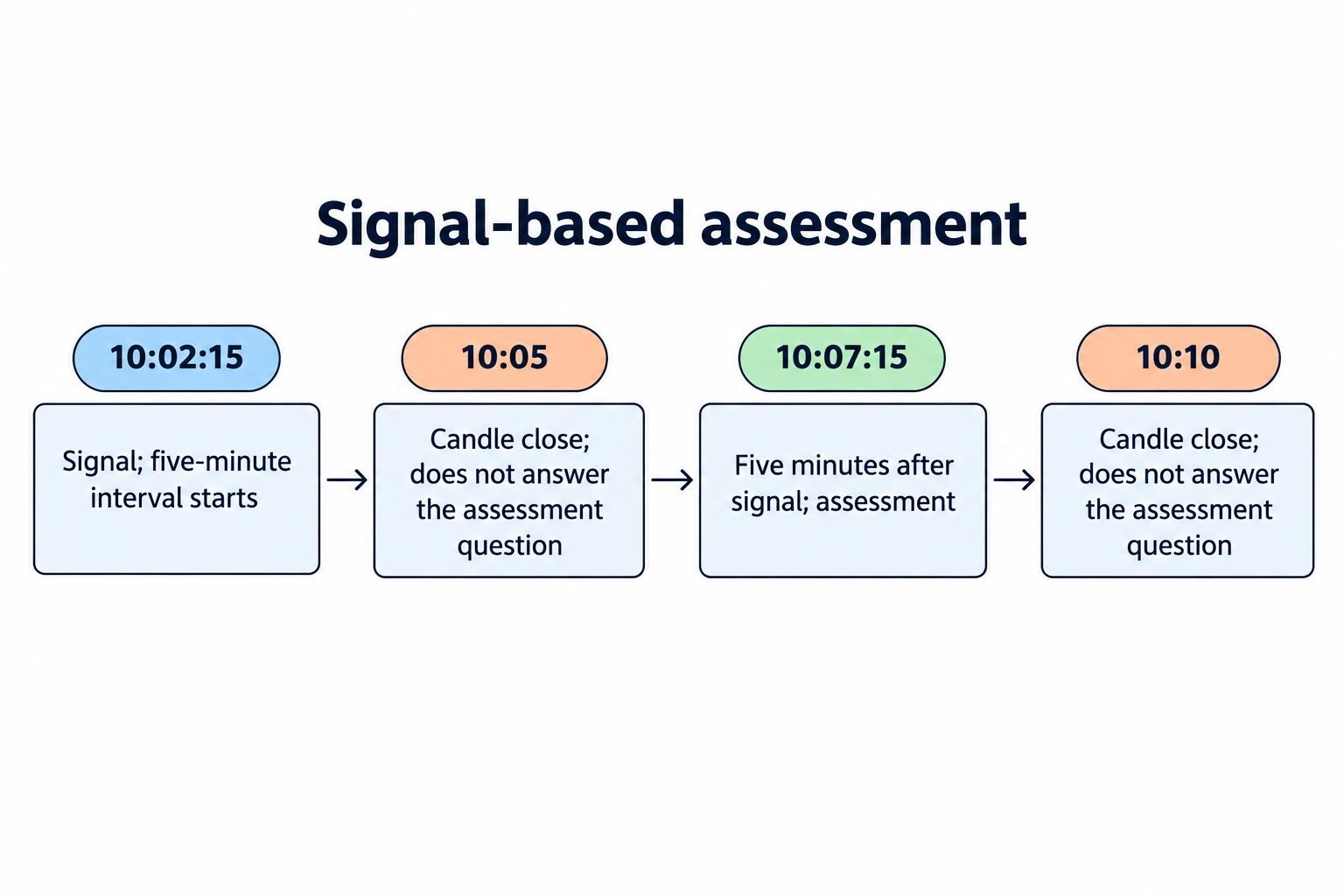
Record the displayed server time and its UTC offset rather than assuming it matches Sydney time. Recheck the mapping whenever an offset changes. In historical testing, write down what happens if there is no quote at the exact assessment time: use the contract’s stated rule where available, or mark the result unresolved. Do not choose whichever nearby price produces a win.
Check Indicators for Repainting and Hindsight
An indicator value on an unfinished candle may change as that candle develops. That is different from revising a historical signal after the information needed to act on it has passed.
The important research question is: what was visible at the moment the decision had to be made? A finished chart cannot always answer that. MT4’s visual indicator testing mode lets you inspect an indicator as the tester advances through simulated price updates.
Use that process to capture the original signal time, direction and relevant values. Compare the record with the chart after more candles have formed. Check whether arrows disappear, move to earlier bars or appear only after later price action confirms a pattern.
Confirmation is not automatically a defect. A method can deliberately wait for later bars before confirming a turning point. The error is recording the trade as though that confirmation existed earlier.
Apply the same check to indicators using a higher timeframe. If a signal reads an unfinished hourly candle, record the value available then rather than substituting the hour’s eventual closing value.
Before relying on a custom indicator, request a plain explanation of its timing rules. Screenshots with perfectly placed arrows are illustrations, not a trading record. Keep settings unchanged during the check, and retain failed signals rather than tidying them out of the evidence.
Backtest the Binary Outcome, Not a Forex Profit Report
MT5’s Strategy Tester can test Expert Advisors and indicators, use different tick generation modes and reserve a later historical period for forward testing. Its strategy testing documentation describes these facilities, including testing based on recorded real ticks.
Those facilities do not automatically turn an ordinary trading strategy into a binary options simulation. A forex test measures the result of positions opened and closed under its own rules. A binary study needs a separate assessment of direction, strike, expiry and payout.
For a hypothetical high/low study, record the signal first. Then assign the entry observation, assessment time and payout assumptions before checking the result. Do not infer success from how far price eventually travelled.
| Research field | What to define |
|---|---|
| Entry | The first eligible observation after the signal, including any assumed delay |
| Assessment | The price rule applied at the chosen expiry |
| Ties and gaps | How equal prices and missing observations are handled |
| Payoff | Net profit on a win and the amount lost on a loss |
Minute candles alone cannot reveal the exact sequence of prices inside each minute. That matters if entry or expiry falls between candle boundaries. Even detailed tick history must match the price reference being studied; more observations do not repair a benchmark mismatch.
Keep the broader binary options backtesting process separate from learning the tester’s controls. A technically successful run can still answer the wrong question.
Include the Payout in the Result
Assume a hypothetical A$100 stake returns A$80 net profit on a win and loses A$100 on a loss. With no ties or other costs, the break-even win rate is:
100 ÷ (100 + 80) = 55.56%.
Across 100 outcomes, 55 wins would produce A$4,400 of profit from winning contracts against A$4,500 lost on losing contracts: a net loss of A$100. Being right more often than wrong would not be enough under those assumptions.
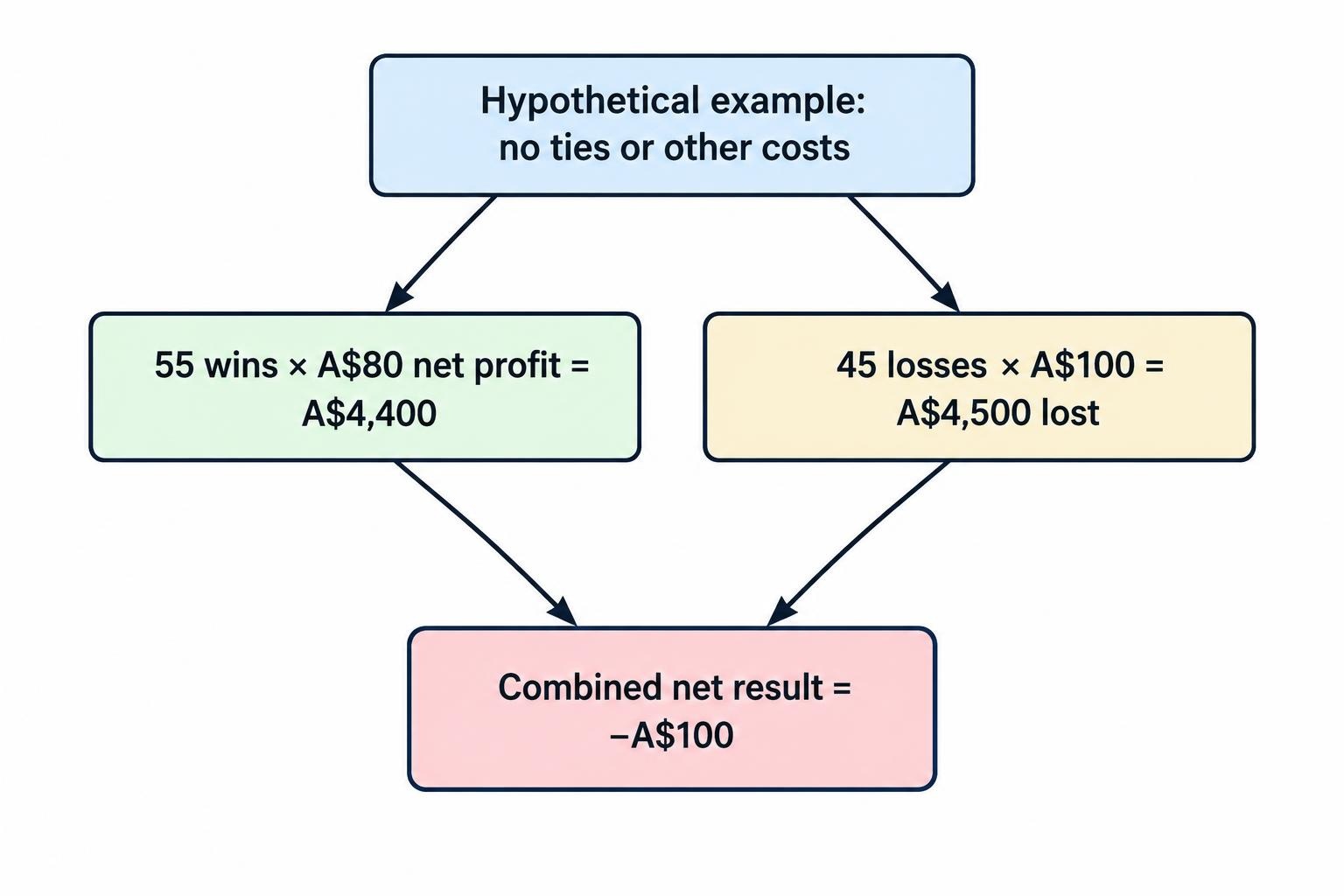
This is why an indicator’s directional accuracy cannot stand in for an economic assessment. Use the principles of probability and expected value when interpreting a paper result, rather than treating a win percentage as the verdict.
Freeze the rules before evaluating a later, untouched sample. Record every tested settings combination, not just the winner. If you change the method after inspecting that later sample, treat it as development data and reserve another period for evaluation.
Treat Plugins and Signal Products as Separate Purchases
Before paying for a custom indicator, ask what it adds beyond a written rule and a manual record. Request its signal timing, supported platform, revision policy and a way to check results independently. “Works with MetaTrader” answers a compatibility question, not a performance question.
For a bridge or automation product, ask for a clear account of where signals go, what permissions it requires and how failed requests are recorded. Assess the receiving service separately from the analytical terminal. Do not provide account credentials or remote computer access just to obtain an indicator demonstration.
Keep unverified tools away from funded accounts. Do not enable external library imports or other permissions solely because an installer tells you to; establish why they are required and obtain an independent technical review where appropriate.
Reject demonstrations that omit losing signals, hide settings or substitute a polished historical chart for timestamped records. A paid arrow still needs evidence.
Where MetaTrader Fits
MetaTrader is most useful here as a controlled research workspace: define a rule, observe what was available at the time and preserve a record that can be checked later. Judge it against those tasks, rather than the number of indicators on the screen.
The broader binary options trading software guide separates analytical tools from execution and automation products. Keep that separation intact. If you cannot establish the reference price, timing rule and payoff assumptions, the honest result is an incomplete study—not a profitable strategy.
This article was last updated on: October 22, 2026