Identity theft and remote access scams can turn a binary options enquiry into a much wider financial problem. A fraudulent trading service may want more than your deposit: copies of your identity documents, access to your email, or control of the device you use for banking.
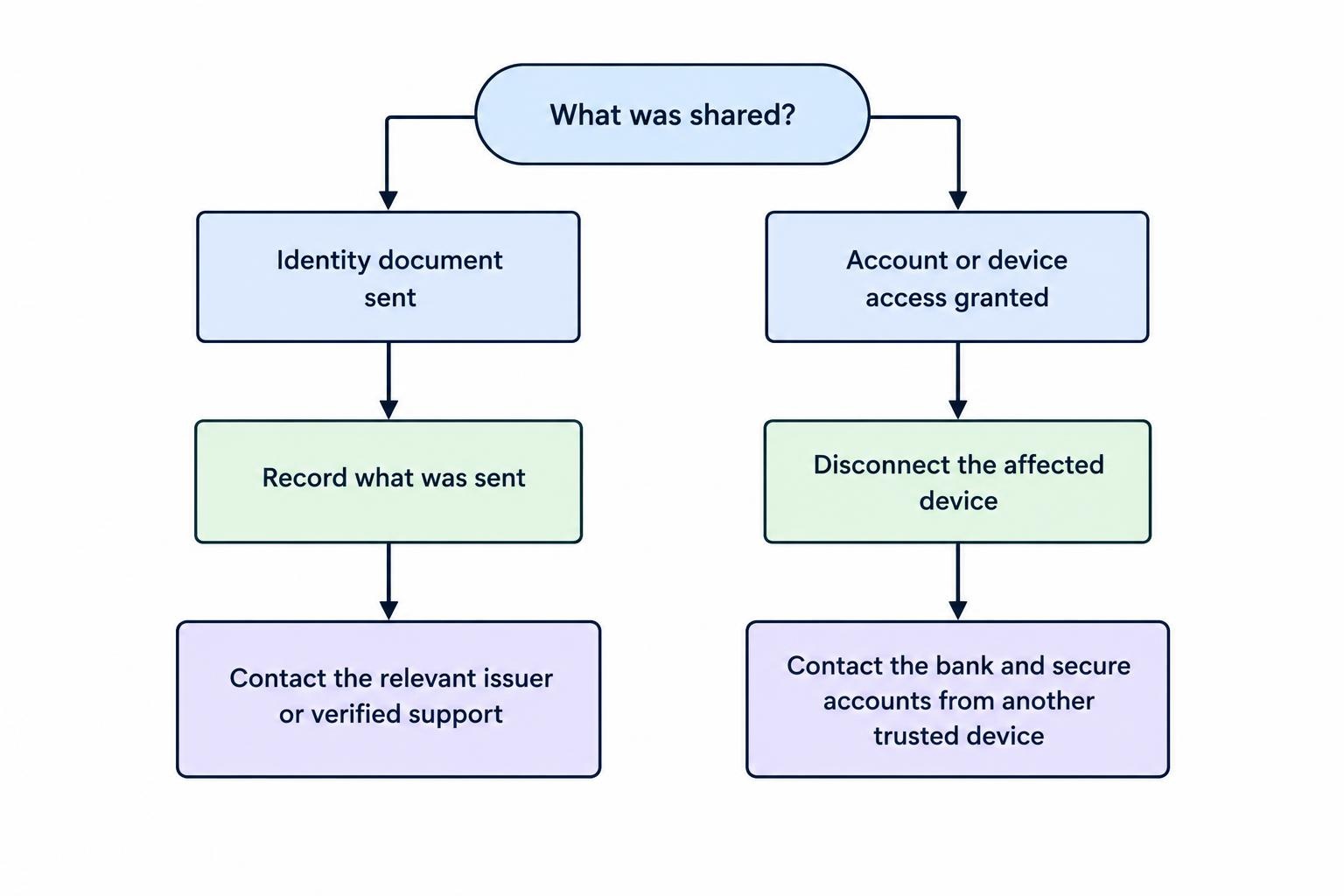
If someone currently has remote access to your device, disconnect it from the internet, end the call and contact your bank from another trusted device. Do not keep following instructions while trying to decide whether the caller is genuine.
For Australian retail clients, there is another clear warning. ASIC’s prohibition on issuing and distributing binary options to retail clients remains in place until 1 October 2031. A request for identity verification does not make an offer lawful or safe. See the ASIC announcement extending the binary options ban.
How Trading Scams Collect Identity Information
The approach may look like account administration rather than theft. Someone presenting themselves as an account manager asks for your passport, driver licence, proof of address or payment card details. Later, they offer to fix a login problem by connecting to your computer.
These requests can work together. Identity documents provide information about you; remote access may expose accounts and files you never intended to share. Investment scams using remote assistance and withdrawal verification to collect identity records appear in the Australian Institute of Criminology’s report on identity crime and misuse.
Consider a hypothetical example. You request a withdrawal from a trading platform. An account manager says your identity check failed and asks you to install a support application. During the session, they ask you to open online banking to prove that the receiving account belongs to you.
At that point, stop treating the conversation as a withdrawal query. The immediate question is whether an unverified person can see or control your banking session. Sorting out the trading balance can wait; protecting the bank account cannot.
Identity Verification Is Not Permission to Access Everything
A request for identification is not, by itself, proof of fraud. It is also not proof that the business requesting it is genuine. Assess the recipient and the proposed process separately from the documents requested.
Before sending anything, establish which legal entity will receive it, why it needs the information and how you can contact that entity independently. Do not use a link supplied in a suspicious message as your only route back to the business. Our guide to broker account verification covers that process in more detail.
Keep a firm distinction between supplying information for a stated purpose and surrendering access to an account. A passport image, an email password and a banking approval code are not interchangeable forms of identification.
Ask a practical question: what will this request allow the other person to do? If the answer is “read my emails”, “approve a payment” or “operate my computer”, the request has moved well beyond checking a document.
If the explanation changes each time you question it, stop. You do not need to satisfy a stranger’s escalating demands to prove that you are a genuine customer.
Remote Access Warning Signs
Remote support software has legitimate uses. Applications such as AnyDesk and TeamViewer are not inherently fraudulent, but scammers can misuse them. An unexpected caller asking you to install screen sharing software, open banking or disclose a security code matches the pattern covered in Scamwatch’s warning about remote access scams.
Treat requests to stay on the phone, act immediately or avoid speaking to anyone else as reasons to pause. Do not let a supposed withdrawal deadline decide whether someone gets access to your device.
Reject a demonstration that requires you to log into banking, email or government services while the caller watches. Ask for written instructions you can review independently instead. If the person refuses that boundary, end the session.
A licence number supplied by the caller should not settle the issue either. Make your own checks rather than accepting a screenshot or certificate. The guide to checking a broker’s licence explains how to examine the claimed business identity without relying on its sales representative.
What to Do After Granting Remote Access
Respond to the access you granted, not just the amount of money you can currently see missing. You do not need to prove that theft occurred before taking protective action.
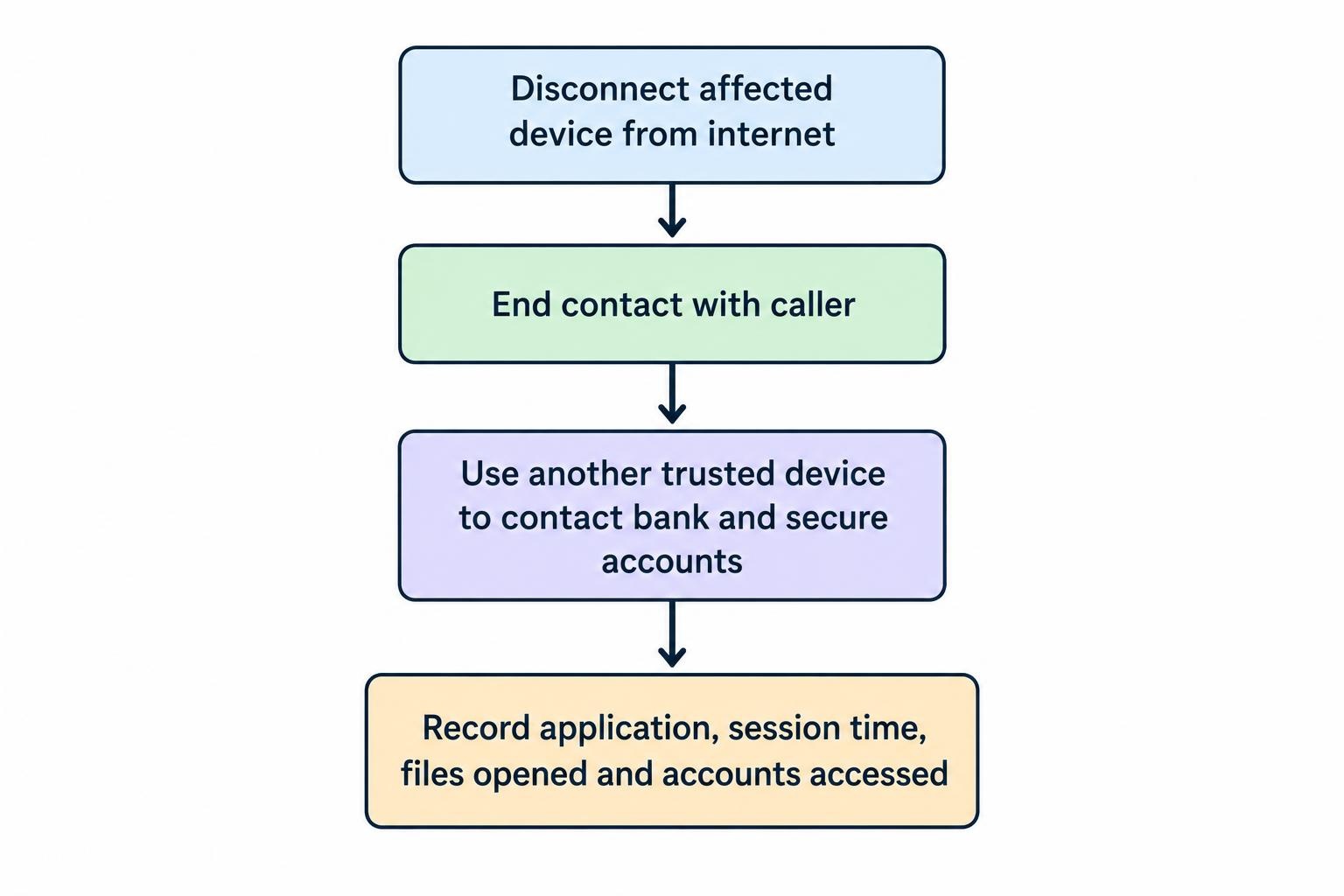
- Disconnect the affected device. Turn off Wi-Fi and mobile data, and unplug any internet cable. Check that it is no longer connected.
- End contact. Hang up and stop responding to instructions, including claims that disconnecting will cancel a refund or damage your account.
- Use another trusted device. Contact your bank and secure important accounts without using the device the caller accessed.
- Record what you remember. Note the application installed, approximate session time, documents opened and accounts accessed.
These containment steps reflect IDCARE’s remote access scam response checklist. If you cannot confidently disconnect or assess the device, ask a trusted person or independently chosen technician for help—not the caller who arranged the session.
Protect Money and Recover Account Control
Call your bank using an independently verified number, such as the number on your card. Explain that a suspected scammer accessed your device. Tell the bank whether you opened banking, entered passwords, shared codes or approved payments. Ask what restrictions, card replacements or transaction checks it recommends.
From a trusted device, secure your email and other important accounts. Change exposed or reused passwords, review recovery phone numbers and email addresses, and remove authentication methods you do not recognise. Use the option to sign out other sessions where available, then enable multi-factor authentication.
Follow the account provider’s recovery process if you have been locked out. Do not use password reset links sent by the suspected scammer. The Australian Cyber Security Centre’s compromised account guidance covers recovery settings, active sessions and connected accounts.
When speaking to support, distinguish between what you saw and what you suspect. “They watched me enter my password” is useful information. “They probably hacked everything” is less useful for deciding which controls need changing.
Check the Device and Your Mobile Number
Removing the visible remote access application is not the whole response. Check for other unwanted software and run a security scan. If you remain unsure about the device, have a computer specialist assess it before using it again for sensitive accounts.
Also watch for unexpected loss of mobile service or messages about transferring your number. Criminals can misuse identity information to take over a phone number and receive calls or SMS security codes. Contact your mobile provider promptly if that happens. Scamwatch’s account and identity takeover guidance covers both device cleanup and fraudulent phone porting.
Tell the technician that this followed a suspected scam, rather than describing it only as a slow computer. Provide the application name and session details. If it is a work device, notify your employer’s IT team before arranging changes yourself.
What If You Sent Identity Documents but Gave No Remote Access?
Treat document exposure as a separate issue. Changing a trading account password does not address the fact that someone may hold copies of your identification.
Prepare an inventory of what you sent: document type, front or back, document numbers, address records and any accompanying photograph or video. Record the destination and date. This gives document issuers and support services a clearer basis for advice than “I sent some ID”.
Contact the relevant issuing authority about protection or replacement. Driver licence advice depends on your state or territory and which numbers were exposed. Tell the ATO promptly if you believe your tax file number was stolen. For Medicare cards and passports, follow the relevant issuer’s process rather than assuming every document needs the same response.
The myGov guidance on replacing stolen identity documents provides the appropriate routes. It also warns that replacing some cards may not prevent misuse of an old number.
Do not send another copy to the suspected scammer to “cancel” the first submission. Deal directly with the issuer or an independently verified support service.
Consider a Credit Report Ban
If you have been, or are likely to be, a victim of identity fraud, you can request a ban on your consumer credit report. This restricts a credit reporting body’s use or disclosure of your credit reporting information, subject to exceptions.
The initial ban lasts 21 days, and requesting it is free. You can request an extension if the concern continues. Arrange coverage across the credit reporting bodies that hold your information; you can ask one body to pass the request to the others.
A ban may also make your own credit applications more difficult. It is a credit reporting safeguard, not a bank account freeze or a replacement for securing your accounts. The OAIC’s guidance on fraud and credit report bans explains eligibility, extensions and the effect of a ban.
Keep the confirmation and expiry date with your incident records. Set a reminder to review the position before the ban ends rather than assuming it continues indefinitely.
Preserve Evidence Without Delaying Protection
Keep messages, emails, website addresses, payment receipts and the names used by the people involved. Record what happened in date order, including when documents were sent and when remote sessions occurred.
Separate facts from estimates. If you cannot remember whether a passport file was opened during the session, write “may have been accessible” rather than presenting it as confirmed. Do not reconnect a suspicious session just to gather better screenshots.
Keep bank, identity support and police reference numbers in one place. For the wider reporting and payment response, use the guide to what to do after a binary options scam. Identity protection should continue alongside that process, not wait for a decision about recovering the deposit.
If someone is helping you, give them a clear job: calling the bank with you, organising records or finding the issuer’s official contact details. Avoid forwarding your entire document collection when a short incident summary will do.
Be Wary of the Next Offer of Help
A second caller claiming to investigate the first incident still needs independent verification. Knowing your name, trading platform or previous loss is not permission to access your device.
Even identity support organisations can be impersonated. IDCARE warns that it will not cold call or send unsolicited messages asking for remote access, copies of a driver licence or the creation of a cryptocurrency account. Its warning about IDCARE impersonation scams describes criminals using a supposed investigation to obtain further access.
For genuine identity support, contact IDCARE through independently obtained details or call its Australian support number, 1800 595 160. Do not let an incoming caller transfer you to a supposed specialist.
Keep money recovery separate from device repair and identity protection. A promise to recover trading funds is not a reason to supply another passport copy, disclose a code or reopen remote access. Our guide to trading fund recovery scams covers that follow-up risk.
The practical boundary is straightforward: stop unverified access, secure affected accounts and handle exposed documents through their issuers. No claimed account balance is worth giving a stranger control of the rest of your finances.
This article was last updated on: October 22, 2026