Charting platforms for binary options analysis should help you inspect prices, record decisions and test rules. They should not be confused with the platform that issues a contract or determines its settlement. A clear chart can support research; it cannot guarantee that an external price matches the price used to decide a binary option’s outcome.
For Australian readers, the regulatory position comes first. ASIC’s prohibition on issuing and distributing binary options to retail clients took effect on 3 May 2021 and remains in force. The ASIC notice extending the binary options ban sets out the restriction. This article covers chart analysis and simulated research, not a route around that prohibition.
The practical choice is therefore not “which platform produces winning signals?” It is which platform provides suitable data, clear timestamps and a research process you can repeat without changing the rules halfway through.
What a charting platform should do
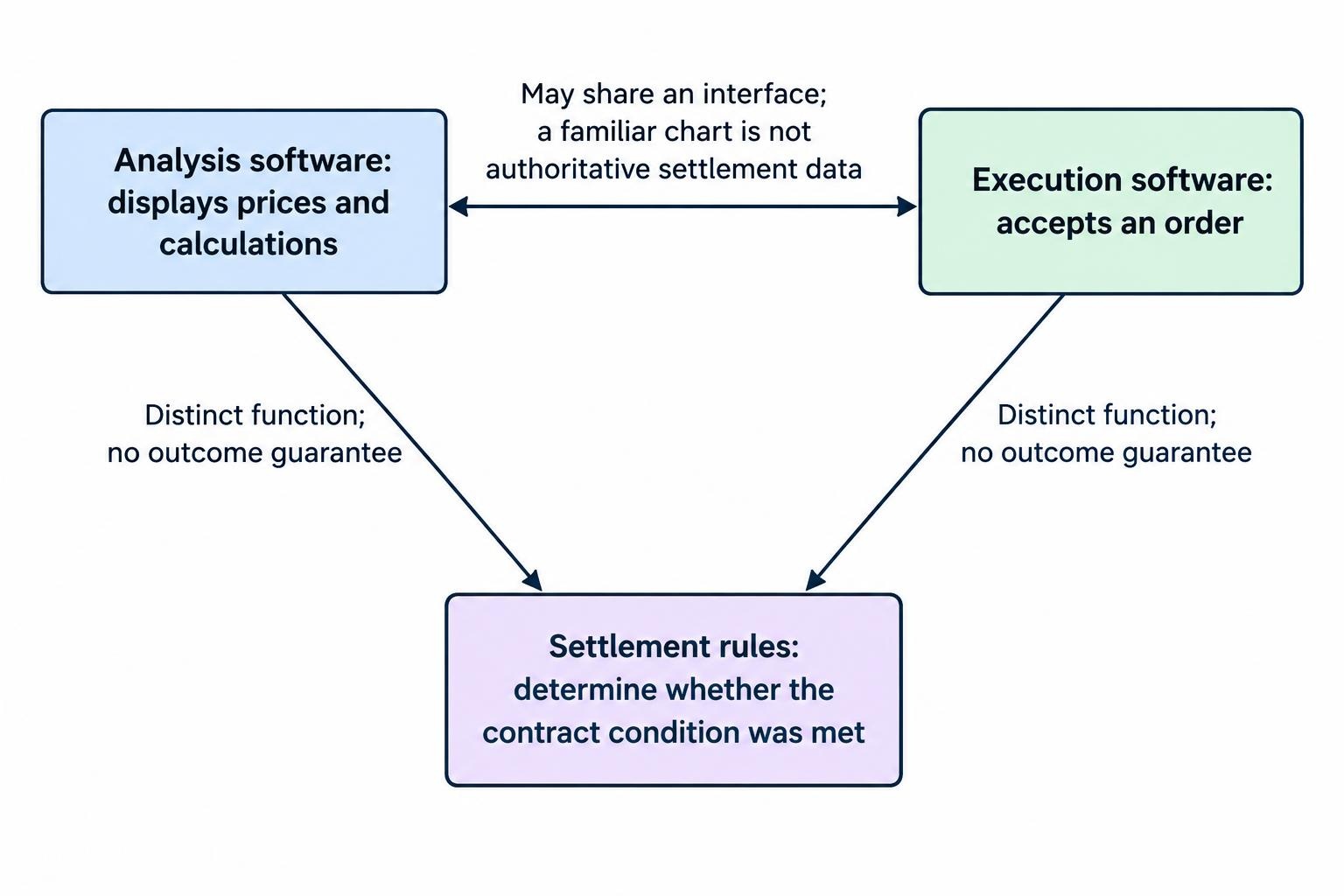
Keep three functions separate: analysis, execution and settlement. Analysis software displays prices and calculations. Execution software accepts an order. Settlement rules determine whether a contract’s condition was met. One interface may combine these functions, but displaying a familiar chart does not make its data authoritative for settlement.
For research, prioritise visible data provenance, precise price inspection and a workspace you can save. You should be able to identify the instrument, inspect individual candles, mark levels and return later without rebuilding the layout from memory. A screenshot should preserve enough context for another person to understand the decision.
Charting is one part of the broader binary options trading software toolkit. It does not replace a record of the assumed strike, expiry, payout or outcome rule. Without those details, a chart review is a visual exercise rather than a test of a binary options hypothesis.
Start with the research question before comparing software. Studying an hourly trend needs a different dataset from assessing what happened during the final seconds before an expiry. Buying more features before defining that question reverses the sensible order.
Charting platforms worth evaluating
TradingView, MetaTrader 5 and Sierra Chart are useful candidates for different research tasks. The comparison below concerns analytical use, not broker suitability, regulatory approval or verified trading performance.
| Platform | Research use to consider | Main check before use |
|---|---|---|
| TradingView | Visual chart review and historical replay | Identify the selected feed and any data delay |
| MetaTrader 5 | Repeatable chart layouts using a selected server’s instruments | Check the symbol specification and price basis |
| Sierra Chart | Historical exchange data research and intraday replay | Distinguish historical data from streaming services |
TradingView: useful for visual research and replay
Consider TradingView when the task involves inspecting past setups without revealing the entire subsequent move. Its Bar Replay function allows you to select a historical starting point, advance manually or play forward, and apply drawings and indicators during the review. The TradingView Bar Replay instructions and restrictions also identify an important trap: ordinary trading panel quotes and orders can still refer to real time while the chart is replaying history.
Keep a separate research record rather than assuming everything visible on screen belongs to the historical moment. Before starting a session, write down the date, instrument, interval and decision rule. Advance only far enough to assess the next decision, then record it before revealing the outcome.
TradingView is worth evaluating for this workflow, but replay capability alone does not establish whether the selected data matches a binary contract’s reference price. The dedicated guide to TradingView for binary options analysis covers its role in more detail. Treat community indicators as hypotheses to inspect, not evidence that a strategy works.
MetaTrader 5: useful for consistent chart workspaces
MetaTrader 5 suits a research process built around saved chart settings. It supports line, bar and candlestick views, multiple timeframes, templates for individual charts and profiles for the wider workspace. Its Data Window exposes candle and indicator values for inspection. These functions are documented in the MetaTrader 5 chart configuration guide.
The practical benefit is consistency. Save a layout with the same chart type, indicator settings and marked reference levels, then use it across research sessions. That removes one avoidable source of variation: changing the display and mistaking the different appearance for a different market condition.
However, the software name does not identify the dataset. Record the connected server and full symbol name alongside the template. If you change the data connection, repeat your compatibility checks before combining new observations with old results.
The separate MetaTrader guide for binary options analysis examines its analytical role. For platform selection, the useful question is whether its workspace and available history fit your research, not whether somebody has attached a “binary signals” label to an indicator.
Sierra Chart: useful when historical data requirements come first
Sierra Chart deserves consideration when the research depends on intraday exchange data rather than a general market overview. Its Historical Data Service provides daily and intraday history, including tick data for supported markets, and allows historical intraday replay. The Sierra Chart Historical Data Service documentation makes the service boundary clear: that historical service does not itself provide streaming real time or streaming delayed data.
That distinction matters when comparing packages. Access to a substantial archive does not necessarily include the current data stream required for observation during an open market session.
Evaluate Sierra Chart against a written data requirement: instrument, period covered, required resolution and whether live observation is necessary. If the task only involves reviewing ordinary candles and marking levels, specialist data arrangements may add work without answering a better question. More software is not automatically more evidence.
Check the price feed before the indicators
The most consequential platform setting may be the selected symbol, not an indicator parameter. A market label alone is insufficient. You need to know what instrument the symbol represents and how its displayed prices are formed.
For example, MetaTrader 5 forms one minute bars for OTC instruments from bid prices, while exchange instrument bars use last trade prices. Its documentation also distinguishes tick volume from actual transaction volume. These are different measurements, not interchangeable display preferences; see the MetaTrader 5 explanation of price data and bar construction.
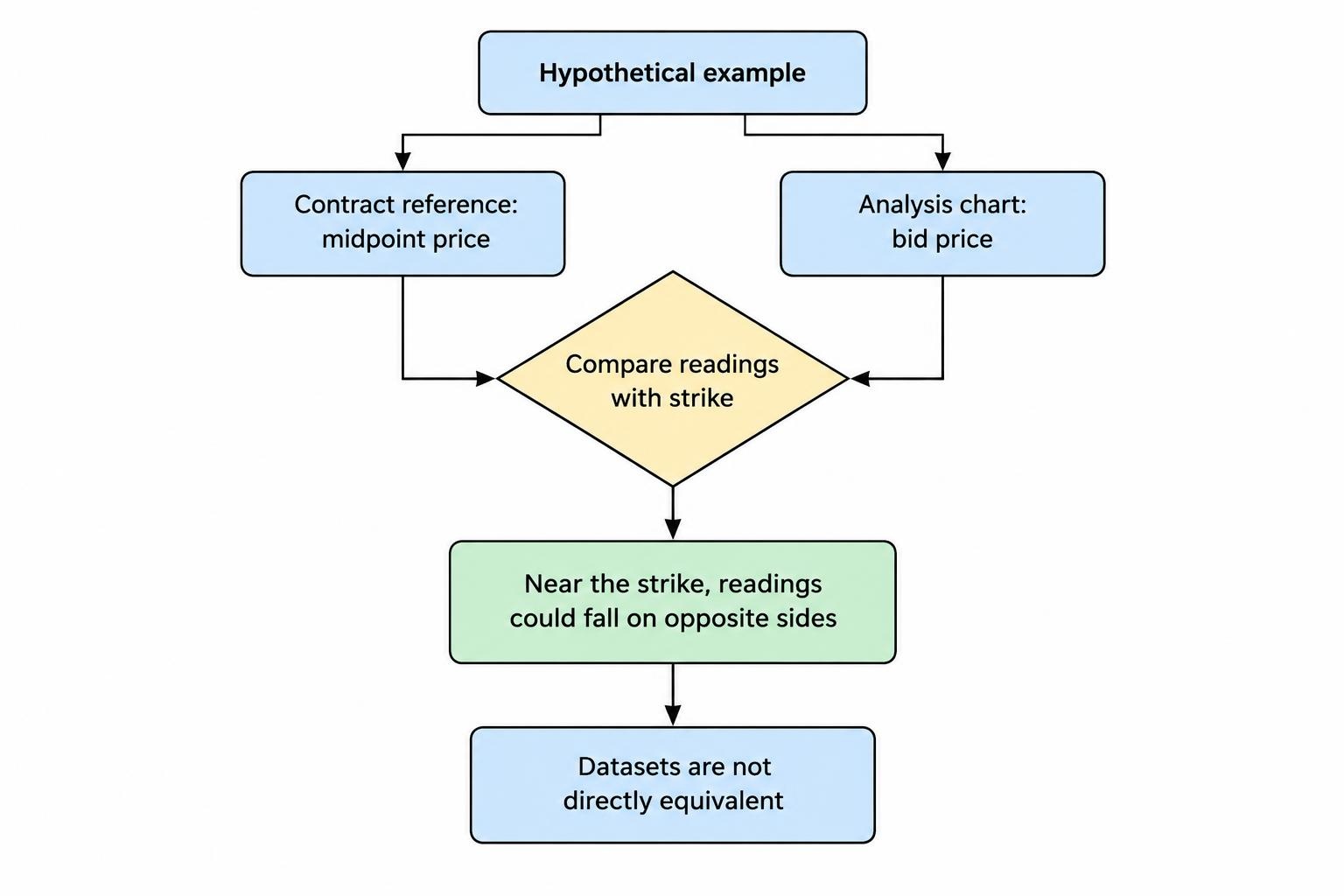
Suppose a hypothetical contract uses a midpoint reference price, but your analysis chart displays bids. Near the strike, the two readings could fall on opposite sides. The chart would not necessarily be broken, and that difference alone would not prove manipulation. You would be comparing different price definitions.
Record the instrument type as well. A cash index, an index future and a derivative carrying a similar market name should not be treated as identical datasets without checking their specifications. The guide to price feeds and benchmarks addresses those comparisons beyond platform selection.
For any compatibility check, preserve the full symbol identifier, provider, price basis, timestamp and declared delay. Compare observations at matching times rather than comparing two screenshots taken several seconds apart.
Do not assume an external chart can reproduce a proprietary weekend or synthetic quote. If the contract’s benchmark and calculation method cannot be established, mark the relationship as unverified. A familiar currency pair name is not enough to join two datasets.
Separate chart intervals from contract expiry
A chart interval describes the period represented by a candle. An expiry describes when a contract’s condition is assessed. A five minute chart does not necessarily align with a contract that expires five minutes after an assumed entry.
Consider a hypothetical observation recorded at 10:02:20 UTC with an expiry at 10:07:20 UTC. A standard five minute candle spanning 10:00 to 10:05 cannot show the required expiry reading. Nor can the following candle’s closing price at 10:10 substitute for it.
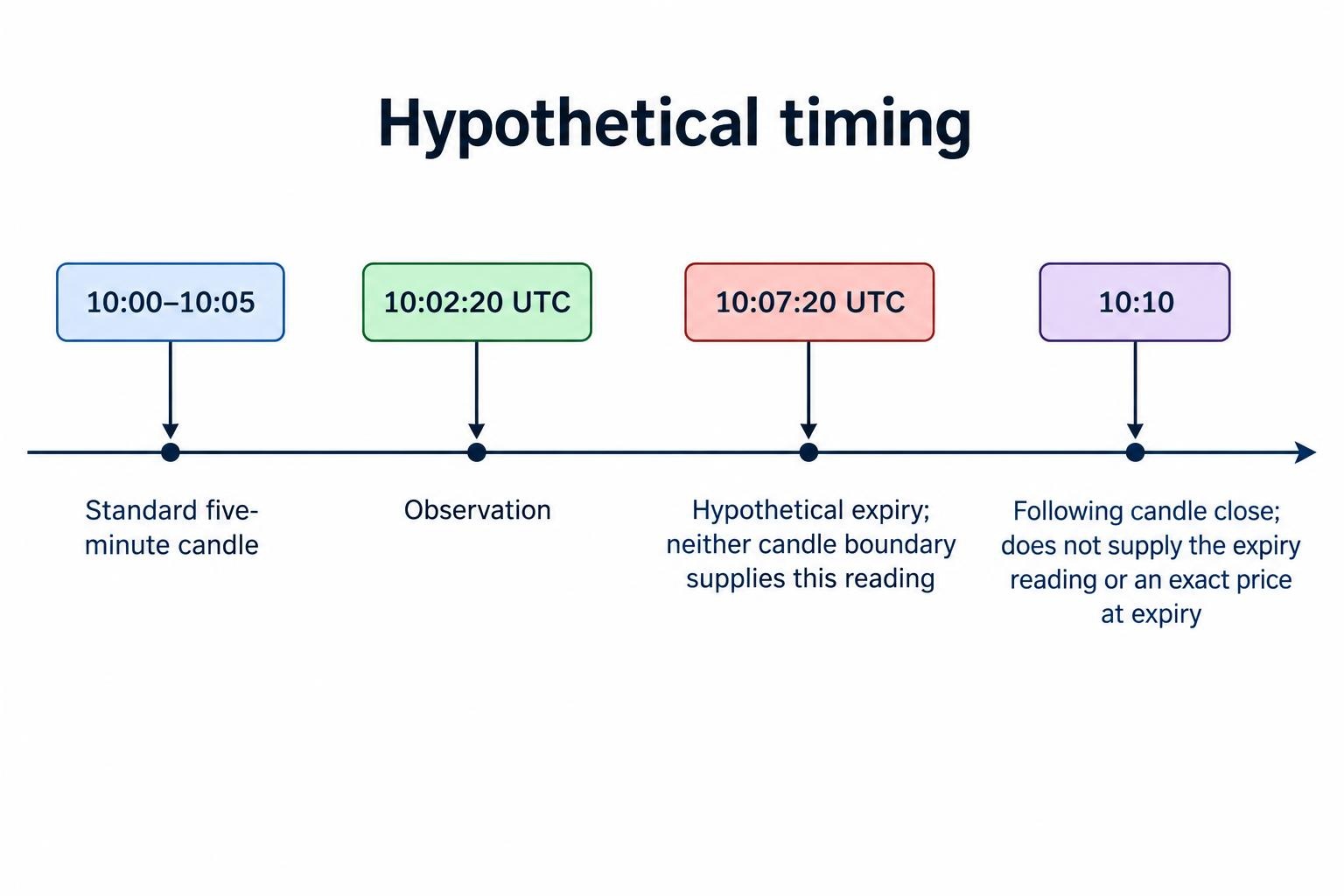
This is why interval choice should follow the measurement task. A broader chart can provide context, while finer data may be necessary to inspect the chosen outcome timestamp. The guide to binary options expiry times explains the contract timing questions separately.
Use one recorded time standard throughout a research project, such as UTC. If you prefer local time, include the date and offset rather than writing “Sydney time” alone. Preserve the original timestamp when converting records.
Also distinguish display time from data arrival time. A timestamp identifies the time assigned to an observation; it does not, by itself, tell you when that observation reached your device. Neither a candle countdown nor a responsive screen proves exact alignment with a settlement process.
Build a workspace that makes decisions auditable
A useful workspace should make it easy to explain what you knew at the time. Begin with ordinary price candles, a readable time axis and a small number of clearly named drawings. Add an indicator only when it answers a defined question.
One view might show the broader trend; another might display the observation interval. A moving average could describe the direction rule, while a volatility measure could support a predefined exclusion rule. There is no need to fill every available panel.
Several indicators derived from the same closing prices should not automatically count as independent confirmations. Before adding another, write down what new information it contributes. If that answer is vague, leave it out.
Keep indicator settings fixed during a test. Record the version of any custom script and whether the rule uses a completed candle or a still forming candle. A signal observed partway through a bar must not be retrospectively replaced with the final bar’s cleaner appearance.
For alerts, define the event precisely: a price touch, a cross or a completed candle condition. During simulated observation, record both the alert time and the time you noticed it. This separates the analytical event from the practical delay in responding.
Save evidence before revealing the result. Screenshots should show the symbol, timeframe, timestamp and relevant levels, not just an arrow pointing at the eventual winner.
Use replay to test decisions, not decorate hindsight
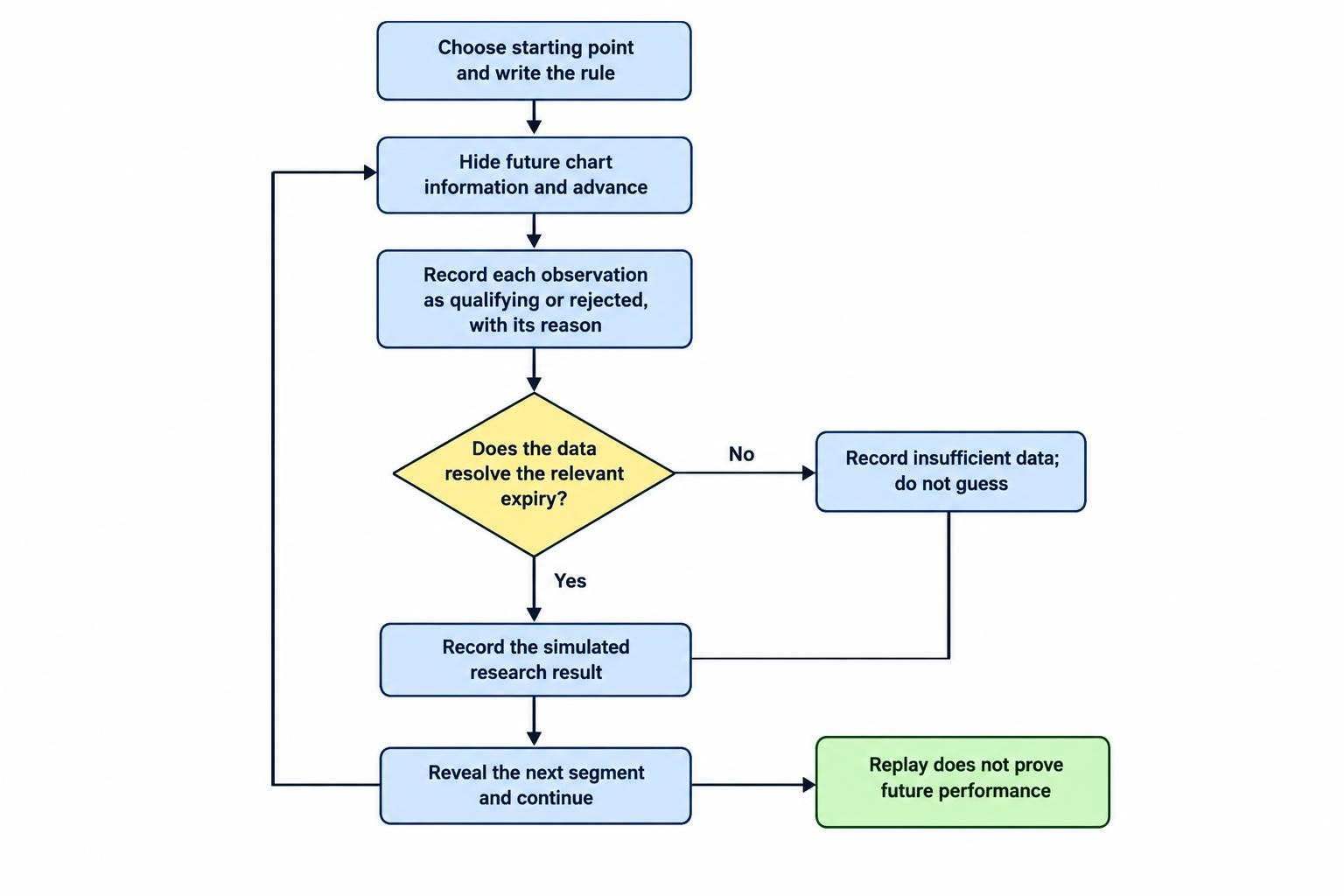
Historical review becomes more useful when the next part of the chart is hidden. Choose a starting point, apply the written rule and record each qualifying observation before advancing. Include rejected setups where the reason for rejection forms part of the method.
Replay still needs suitable data. A candle’s open, high, low and close do not reveal the complete sequence of prices inside it. If a hypothetical strike and expiry fall within that candle, those four values may not establish the outcome. Record insufficient data rather than awarding an assumed win.
A general trading strategy report also needs inspection before it can support binary options research. The test must represent the relevant expiry and payout structure, rather than substitute profit from buying and later selling the underlying instrument. The dedicated guide to backtesting binary options strategies covers that modelling work.
For a simple illustration, assume every winning observation earns 0.8 units of net profit and every loss costs one unit. A sequence of 55 wins and 45 losses produces 44 units of gains and 45 units of losses: a net loss of one unit. Calling the method “55% accurate” leaves out the part that determines its financial result.
That illustration assumes a constant payout, no ties and no other costs. A useful research record states those assumptions rather than hiding them inside a headline win rate.
Keep a separate period for checking rules after development. Repeatedly adjusting settings against the same historical sample can produce an attractive description of the past without demonstrating that the rule holds elsewhere.
Compare the full cost of usable chart data
Separate the platform subscription from the market data required for the task. TradingView’s paid plans do not include the exchange fees charged for many stock and futures real time feeds. Its market data subscription guidance explains how to identify the relevant feed and check a displayed delay.
Before paying, price the complete research arrangement: software access, necessary data, historical coverage and any required add ons. Check billing currency, renewal terms and cancellation conditions at the point of purchase rather than relying on an old comparison table.
A free or delayed chart may be adequate for learning chart controls or reviewing completed sessions. It is not adequate for measuring a current event against a short future deadline if the required observations arrive too late.
Pay for a feature only when you can name the task it enables. More simultaneous charts may help compare instruments. A longer archive may help assess another period. Neither purchase makes the underlying hypothesis better by itself.
A practical platform selection process
Use the same small research exercise to compare platforms. Select one instrument, one observation interval and one written rule. Then assess whether each candidate lets you complete the task without uncertain timestamps, missing data or repeated manual reconstruction.
- Identify the data. Record the provider, full symbol and price basis.
- Check the required history. Confirm that the relevant dates and resolution are actually accessible.
- Test inspection and record keeping. Retrieve exact values and preserve a readable decision record.
- Repeat the session. Reopen the workspace and check that the same settings and observations can be recovered.
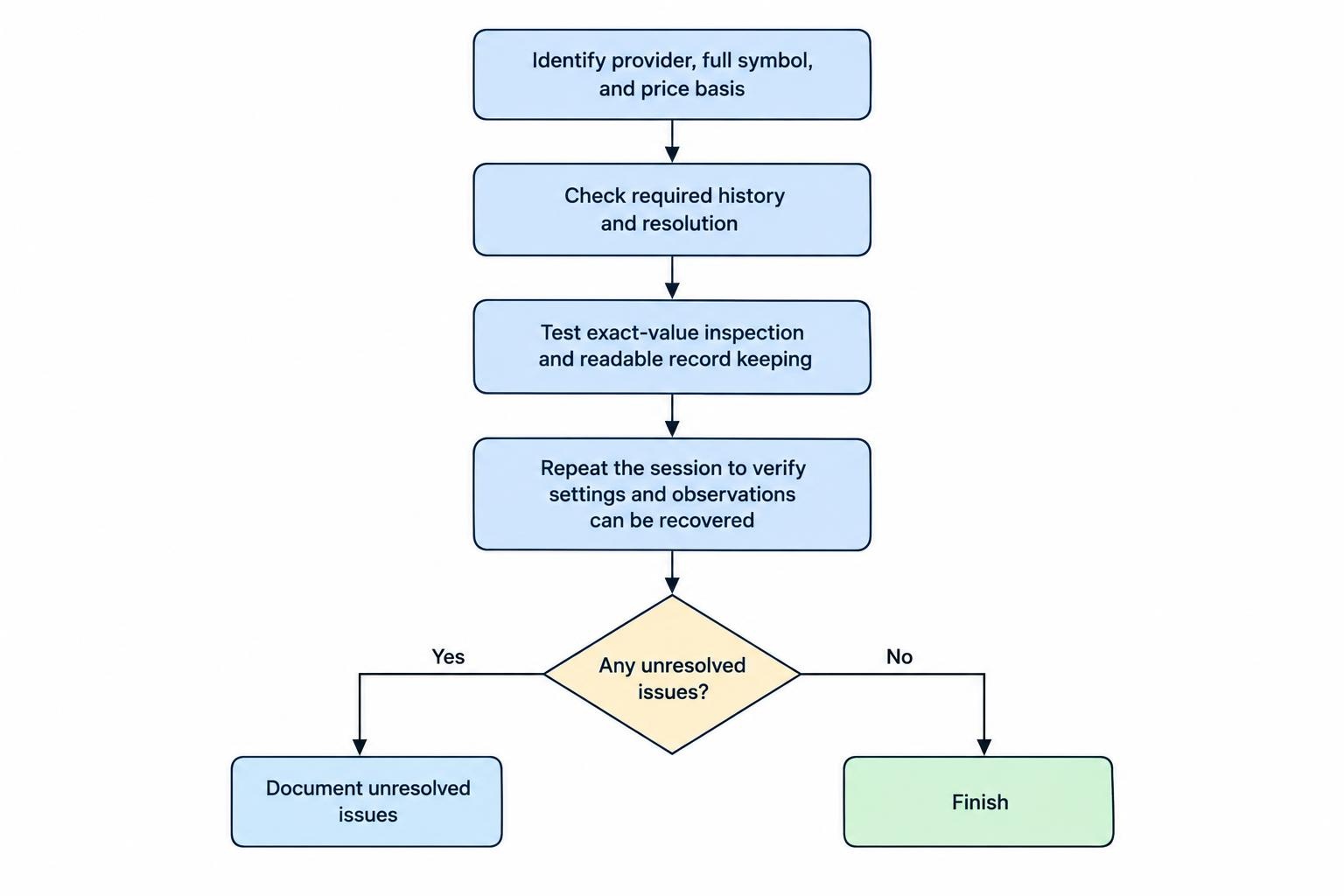
Keep the results in a trading journal, including unresolved problems. “Could not verify the benchmark” is a useful finding. Leaving that field blank and carrying on is not.
Choose on the basis of the completed exercise rather than the longest feature list. TradingView may fit a visual replay workflow; MetaTrader 5 may fit repeated work with saved chart profiles; Sierra Chart may fit a project with more demanding historical data requirements. Those are reasons to evaluate them, not universal rankings.
The right charting platform makes its data understandable and your decisions reviewable. It should help you find weaknesses in a research method, including the possibility that the available evidence does not support using it at all.
This article was last updated on: October 22, 2026