Fake trading apps imitate investment platforms while directing money or personal information to scammers. They may display price charts, account balances, completed trades and withdrawal buttons. None of those features proves that the operator holds your money or executes the trades shown.
For Australians researching binary options, there are two separate questions: is the app genuine, and can its operator lawfully offer the product? Passing one check does not answer the other. If you have already paid into a suspected fake app, stop sending money and contact your bank or payment provider immediately. Do not wait for the app’s support team to finish another “account review”.
The Australian binary options restriction comes first
Australia’s ban on issuing and distributing binary options to retail clients began on 3 May 2021 and runs until 1 October 2031. The ASIC binary options product intervention announcement sets out that restriction. An app store listing, working software or an overseas business address does not change it.
An app that promises Australian retail customers access to binary options should therefore raise a regulatory concern before you assess its design or trading features. A genuine download is not the same thing as an authorised financial service.
What makes a trading app fake?
The central deception is the gap between what the screen shows and what happens to your money. A fake platform can record a deposit, increase an account balance and display profitable trades without providing the investment it advertises.
Investment scammers use fabricated account data and may allow small withdrawals to build trust before refusing larger requests. These are documented features of investment scams identified by Scamwatch. A small payment back to your bank account therefore does not establish that the remaining balance exists or is available.
Keep three different problems separate:
- A fabricated trading platform: the advertised trading service or investment does not exist as presented.
- An impersonation app: the software claims a connection with a real financial business that has not authorised it.
- Malicious software: the app attempts to steal information, misuse permissions or compromise the device.
These problems can overlap, but they are not interchangeable. Fraud does not require a hacked phone. If someone persuades you to transfer money voluntarily to a fabricated investment, the deception can succeed without stealing a password.
Conversely, a losing trade or an app crash does not, by itself, establish fraud. Focus on the operator’s identity, the service promised, the payment destination and the evidence available outside the app.
Can fake trading apps appear in official app stores?
Yes. Fake crypto trading apps can appear on legitimate application platforms, and scammers may also direct people to download software from their own websites. Moneysmart’s warning about fake trading apps covers both routes. Store availability should not replace checks on the financial business behind the software.
A store listing answers a narrow question: where can you obtain this application? It does not establish that the advertised investment exists, that the contact recommending it works for the named company, or that the product can be offered to you.
Before installing anything, compare the listed developer with the operator’s independently verified details. Examine the support address and linked domain, rather than relying on the app name and logo. If a genuine company confirms that it uses an outside developer, that can explain a different developer name. An unexplained mismatch needs investigation.
Treat ratings and reviews as prompts for further checks, not permission to deposit. A polished interface is not a character reference.
Installation requests that deserve extra scrutiny
Be cautious when an online contact sends an installation file, asks you to ignore a security warning or offers access to a supposedly exclusive testing version. The FBI has documented investment fraud involving mobile beta testing apps used to steal money and information. Those schemes included apps that copied familiar names and imagery and directed purported investment funds to criminals.
Testing software is not inherently fraudulent. The problem is treating a private invitation as evidence that the person or investment is genuine. An “early access” explanation should not end your checks.
Review requested permissions against the task the app claims to perform. An unexplained request to read messages, access contacts or control other activity on the phone deserves a stop, not a hurried tap on “Allow”. Ask why the permission is needed, but verify the answer independently rather than accepting a salesperson’s reassurance.
Do not use battery drain, slow performance or the absence of security alerts as your verdict. Those observations cannot settle whether the investment is real. The financial checks still matter even when the phone appears to work normally.
Check the business behind the app
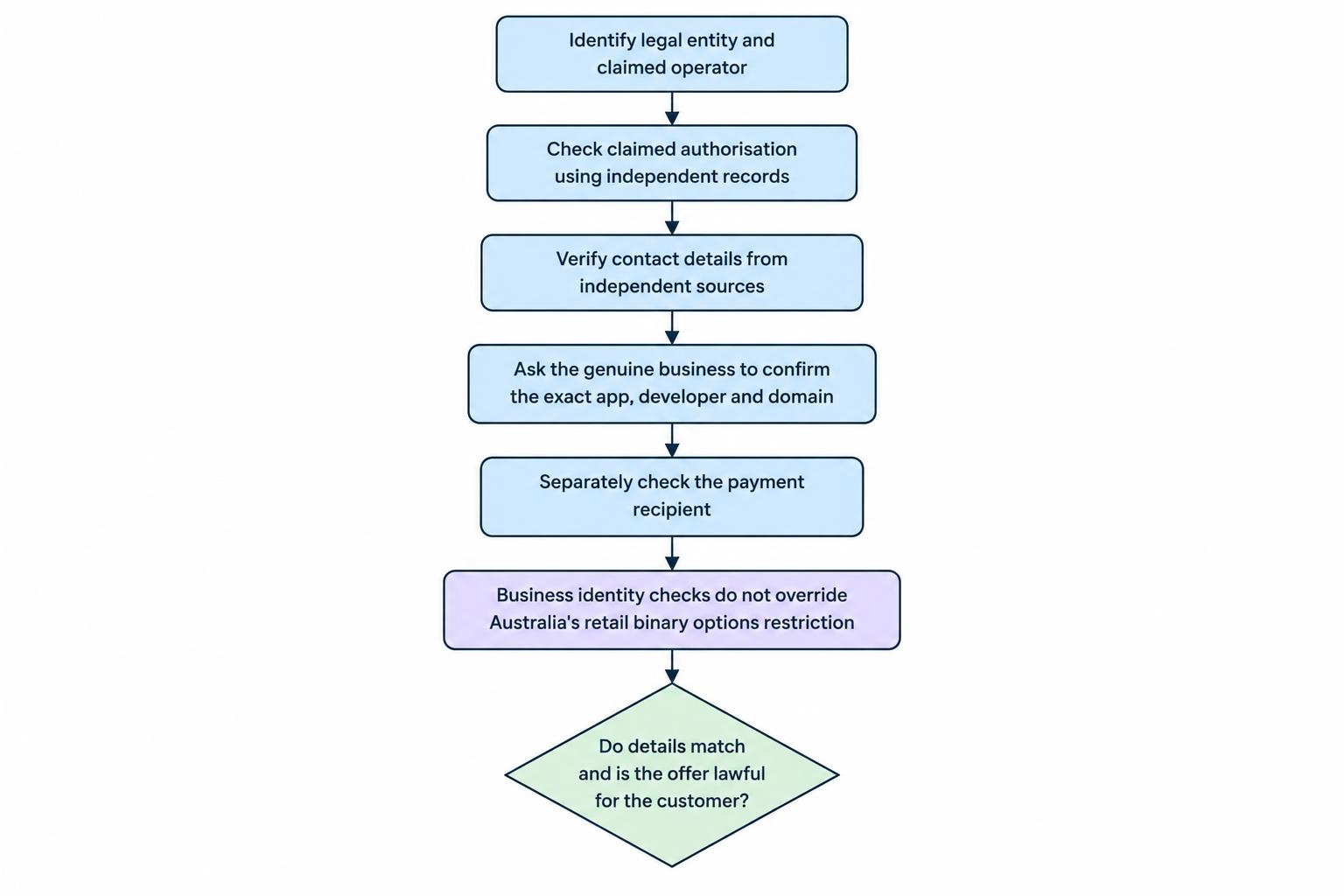
Start with a legal entity name, not a brand name. Identify the business that claims to provide the service, its claimed licence or authorisation, its official domain and the party receiving payments. Record those details before supplying identity documents or transferring money.
Check claims through independent records. Moneysmart’s investment verification guidance distinguishes company registration from financial services authorisation and explains how to check claimed licence details. It also makes clear that an Australian financial services licence is not ASIC endorsement or a guarantee against loss.
Do not stop because a licence number belongs to a real company. Establish whether the app and the people contacting you actually belong to that company. Reach the business using contact details found independently, not the number inside the app or a link supplied by the person promoting it.
Ask the genuine business to confirm the exact app, developer and domain. Avoid broad questions such as “Do you have a mobile platform?” A scammer’s software may use the same brand name while having no connection with the real operator.
This is the distinction covered in our guide to clone broker scams: identifying a legitimate business does not authenticate everyone borrowing its identity.
Also question any unexplained difference between the operator and payment recipient. Do not let an account manager dismiss the mismatch as routine processing without evidence you can check elsewhere. For binary options offered to Australian retail clients, business identity checks do not override the product ban.
Charts and account statements are not independent proof
Live market data can make a fake platform look convincing. ASIC has identified scam sites that embed trading charts, news feeds and chat tools to create the appearance of a functioning financial business. Its warning about investment scam website tactics also describes slick templates and false AI trading claims.
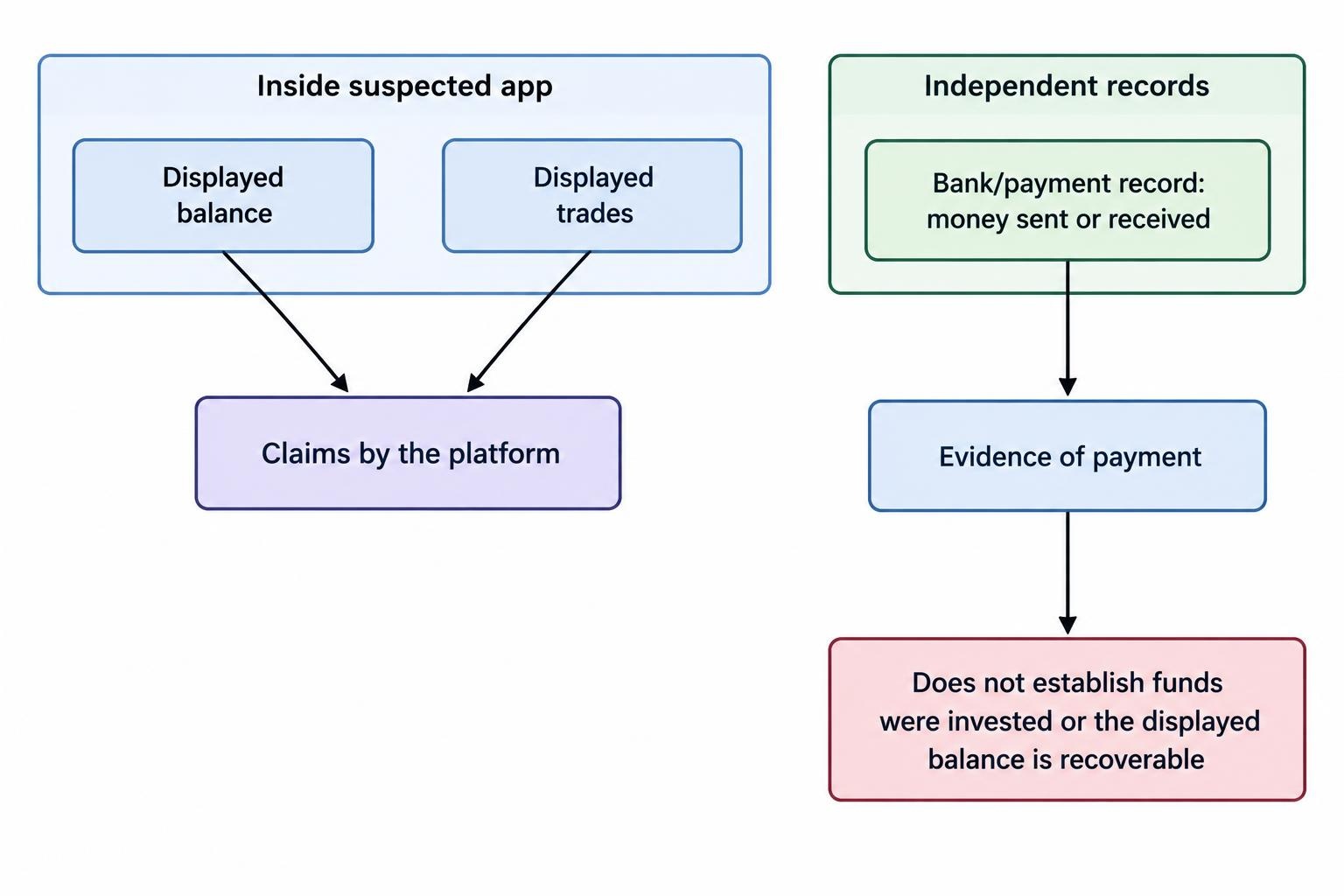
The chart may be real, the account behind it may not. Watching a price move in line with another service does not prove that your order was executed or that the displayed balance represents recoverable money.
The same distinction applies to downloadable statements. A document produced by the suspected platform is still that platform’s claim. Adding a transaction number or company logo does not turn it into independent confirmation.
Separate what you can observe from what you are being asked to believe. You can observe that a payment left your bank account. That alone does not establish that the recipient invested it, safeguarded it or generated the profits shown on your phone.
A worked example: the balance grows, but access disappears
Consider this hypothetical sequence. A person joins a trading group and downloads the app recommended by its administrator. They deposit A$400. The app soon displays a balance of A$620, and a A$50 withdrawal reaches their bank account.
Encouraged by that result, they deposit another A$4,000. Their displayed balance rises to A$9,800. When they request a withdrawal, support demands A$1,470 for a “tax clearance” before releasing anything.
The dependable figures are the payments made and received: A$4,400 sent and A$50 returned. The person has a net cash outflow of A$4,350. The A$9,800 screen balance is not independently established wealth.
Paying the extra A$1,470 would increase the cash at risk. It would not verify the balance or establish a right to receive it. Our guide to fake tax and withdrawal release fees examines that demand in more detail.
Do not send another deposit to test whether the platform will honour its promise. Nor should you keep placing trades to meet a newly announced withdrawal condition. Once the operator’s honesty is in doubt, activity inside its own system cannot resolve that doubt.
What to do if you have installed a suspected fake app
Your response should match what happened. Downloading an app, entering a reused password, uploading a passport and granting remote access create different exposures. Make a short record of which actions you took, then address the most urgent risk first.
Protect your money before arguing with support
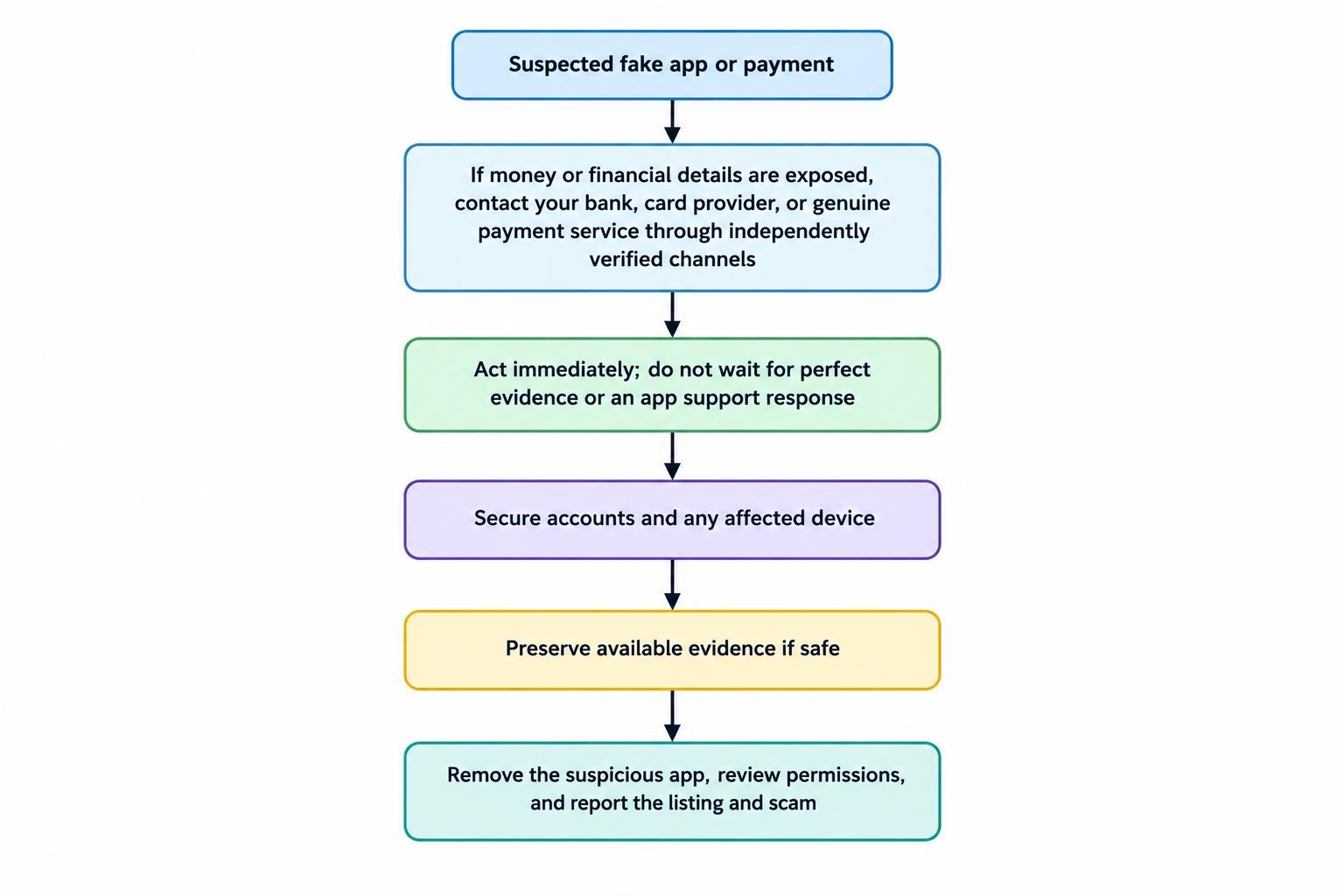
If you paid money or exposed financial details, contact your bank, card provider or the genuine payment service immediately through independently verified channels. Explain that the payment relates to a suspected fake investment app. Ask what transactions can be stopped and what accounts or cards need protection.
Scamwatch’s immediate response guidance recommends contacting the bank or card provider promptly and stopping further payments. Do not delay that call while collecting perfect screenshots or waiting for a withdrawal deadline.
Secure exposed accounts
Use a different, trusted device if you suspect the installed app or remote access software has compromised your phone. If someone has an active remote connection, end it and disconnect the affected device from the internet while you obtain help.
Change any password you entered into the suspicious service if you also use it elsewhere. Review account recovery details, remove unfamiliar recovery methods, sign out other sessions where the provider offers that option, and enable multifactor authentication. Prioritise financial accounts and email.
These account recovery measures follow the Australian Cyber Security Centre’s compromised account guidance. Follow the genuine account provider’s recovery process rather than password reset links sent by the suspected scammer.
Remove the app without overlooking other exposure
Once urgent financial protection is underway, preserve readily available evidence if safe, then remove the suspicious software and review its permissions. Keep the operating system updated. If you granted remote access or cannot establish what was installed, obtain technical help through a provider you independently choose.
Uninstalling is not a complete response if you also shared passwords or identity documents. Tell your bank what information was exposed, and consider contacting IDCARE for help planning your response to possible identity misuse.
Preserve evidence and report the app
Record the app’s exact name, developer, store listing or download address, and any connected domains. Keep copies of conversations, payment receipts, recipient details and withdrawal demands. For cryptocurrency payments, retain the transaction identifier and destination wallet address.
Distinguish real payments from displayed profits in your report. “I transferred A$4,000 and the app showed A$9,800” is clearer than reporting A$9,800 as money deposited. Note which figures you can support with bank or payment records.
Report the listing through the relevant app store’s reporting process. Use Scamwatch to report the scam, and ReportCyber for an online police report where money or information has been stolen. Our guide to what to do after a binary options scam covers the wider response without relying on the app’s own complaint process.
Be cautious about anyone who subsequently promises to recover the money for an advance payment. A convincing recovery pitch should receive the same independent scrutiny as the original investment offer.
The practical rule is straightforward: verify the operator and the offer outside the app before trusting anything displayed inside it. If that verification fails, stop. More deposits, more trades and more conversations with the same account manager will not turn an unsupported screen balance into money you control.
This article was last updated on: October 22, 2026